

Is Your Website Actually Secure? A Small Business Cybersecurity Checklist
A Cybersecurity Awareness Month guide for Maine small businesses
October is Cybersecurity Awareness Month, and while most headlines focus on large corporations and data breaches, small businesses are a favorite target for attackers—precisely because they tend to have fewer defenses in place. If your website hasn't had a security check-up in a while, this is a good month to change that.
The good news: most small business website security comes down to a handful of fundamentals, not expensive enterprise tools. Here's what actually matters, and why it affects more than just your risk of getting hacked.
Why Website Security Isn't Just an IT Problem
For many small business owners, "security" sounds like someone else's job—something the web host or platform handles automatically. In reality, a business website is often the most exposed piece of digital infrastructure a small business has, and neglecting it can cost more than you think.
- Trust and credibility. A browser security warning, an expired certificate, or a hacked page redirecting visitors to spam content can undo months of marketing effort in a single visit.
- SEO impact. Search engines actively downrank or flag sites that are compromised, outdated, or missing basic security signals like HTTPS. Security and SEO are more connected than most business owners realize. [INTERNAL LINK: /blog/the-hidden-cost-of-ignoring-website-accessibility-and-how-it-affects-seo "Similar to how accessibility issues affect your rankings"], security gaps send the same kind of negative signal.
- Downtime and recovery cost. A compromised website often means hours or days of downtime, cleanup costs, and — for businesses that collect any customer information — potential legal and reputational fallout.
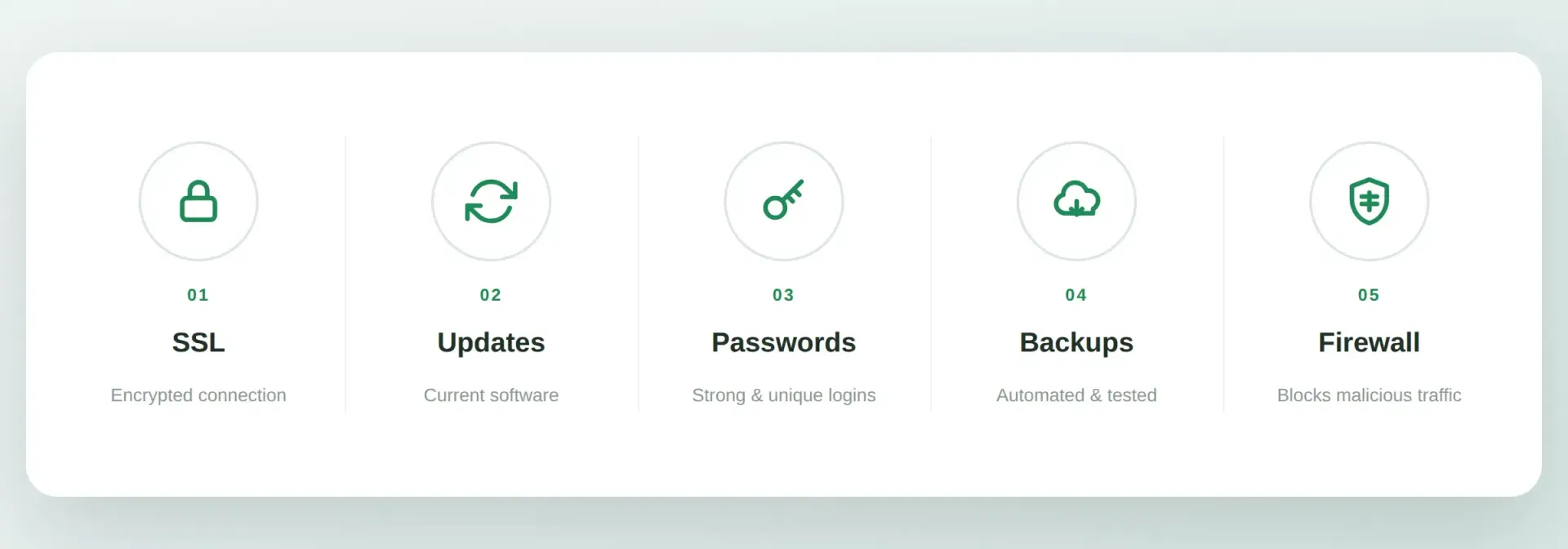
The Essentials: What Every Small Business Website Needs
1. An Active SSL Certificate
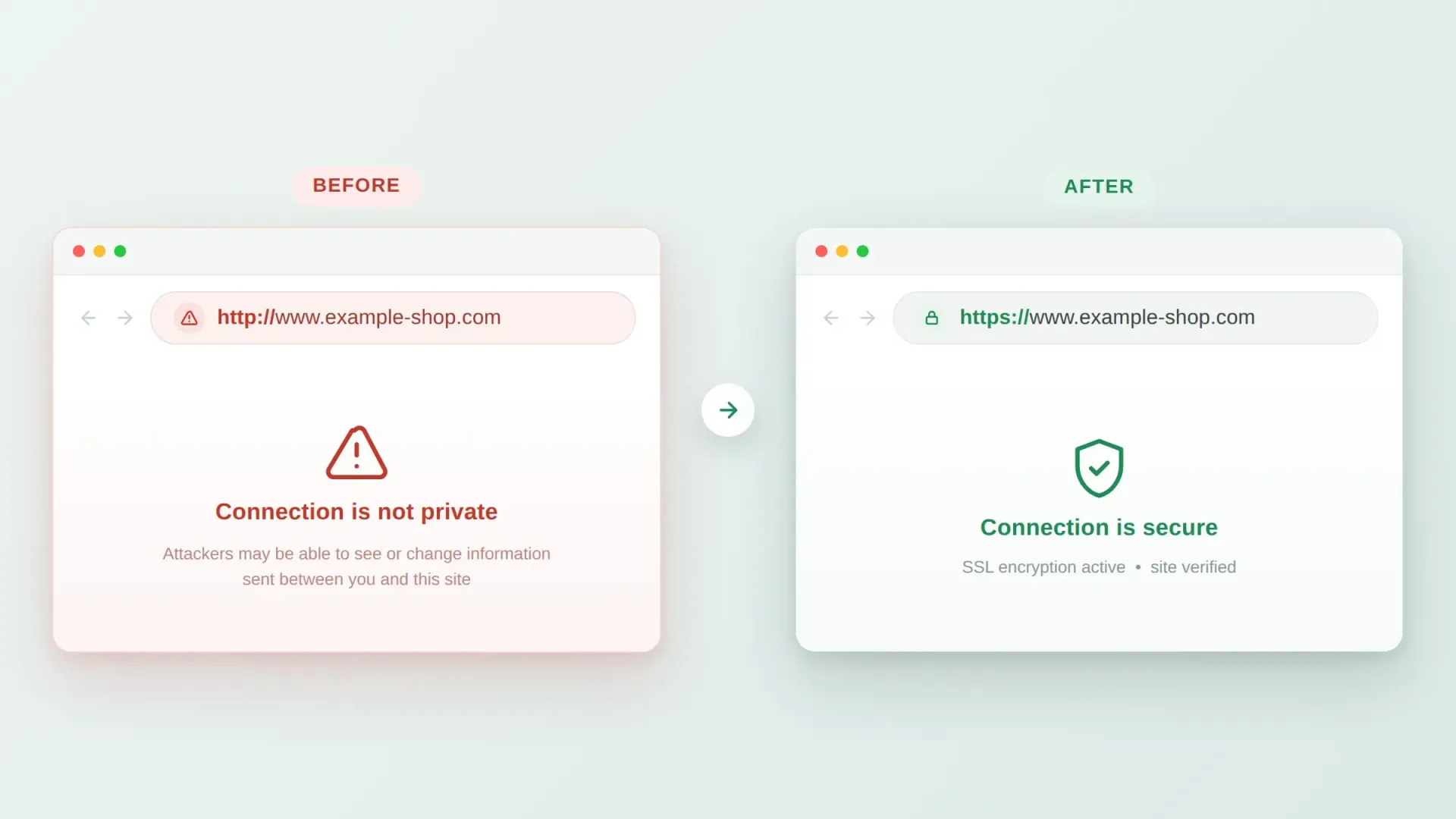
If your website URL doesn't start with "https://" and show a padlock icon, that's the first and most visible fix. An SSL certificate encrypts data passing between your site and its visitors, and its absence is flagged by most browsers as an active warning to visitors — not just a missing nice-to-have.
Most modern hosting providers include SSL certificates for free or at low cost, and it's typically a one-time setup rather than an ongoing hassle once configured correctly.
2. Regular Software and Plugin Updates
If your site runs on a content management system like WordPress, outdated plugins and themes are one of the most common ways small business websites get compromised. Attackers actively scan for known vulnerabilities in outdated software — it's rarely a personal, targeted attack, just an automated scan finding an easy opening.
A simple habit: check for available updates monthly at minimum, and apply security patches as soon as they're released rather than waiting for a larger update cycle.
3. Strong, Unique Login Credentials
"Admin" as a username and a simple, reused password remain shockingly common on small business websites — and they're one of the easiest doors for an attacker to walk through. Use unique, complex passwords for your website's admin accounts, enable two-factor authentication where available, and limit who has admin-level access.
4. Automated, Tested Backups
Backups don't prevent an attack, but they determine how bad the aftermath is. A site with recent, working backups can often be restored within hours. A site without them may lose content permanently or require rebuilding from scratch.
Two things matter here: automation (a backup you have to remember to run manually is a backup that eventually doesn't happen) and testing (a backup you've never confirmed you can actually restore from isn't a reliable safety net).
5. A Web Application Firewall
A web application firewall filters out malicious traffic before it reaches your site — blocking common attack patterns like SQL injection attempts and brute-force login attacks automatically. Many hosting providers and security plugins offer this as a relatively simple add-on rather than something that requires deep technical expertise to manage.
The Essentials: What Every Small Business Website Needs
1. An Active SSL Certificate
If your website URL doesn't start with "https://" and show a padlock icon, that's the first and most visible fix. An SSL certificate encrypts data passing between your site and its visitors, and its absence is flagged by most browsers as an active warning to visitors — not just a missing nice-to-have.
Most modern hosting providers include SSL certificates for free or at low cost, and it's typically a one-time setup rather than an ongoing hassle once configured correctly.
2. Regular Software and Plugin Updates
If your site runs on a content management system like WordPress, outdated plugins and themes are one of the most common ways small business websites get compromised. Attackers actively scan for known vulnerabilities in outdated software — it's rarely a personal, targeted attack, just an automated scan finding an easy opening.
A simple habit: check for available updates monthly at minimum, and apply security patches as soon as they're released rather than waiting for a larger update cycle.
3. Strong, Unique Login Credentials
"Admin" as a username and a simple, reused password remain shockingly common on small business websites — and they're one of the easiest doors for an attacker to walk through. Use unique, complex passwords for your website's admin accounts, enable two-factor authentication where available, and limit the number of people who have admin-level access.
4. Automated, Tested Backups
Backups don't prevent an attack, but they determine how bad the aftermath is. A site with recent, working backups can often be restored within hours. A site without them may lose content permanently or require rebuilding from scratch.
Two things matter here: automation (a backup you have to remember to run manually is a backup that eventually doesn't happen) and testing (a backup you've never confirmed you can actually restore from isn't a reliable safety net).
5. A Web Application Firewall
A web application firewall filters out malicious traffic before it reaches your site — blocking common attack patterns like SQL injection attempts and brute-force login attacks automatically. Many hosting providers and security plugins offer this as a relatively simple add-on rather than something that requires deep technical expertise to manage.
A Quick Self-Check You Can Do Today
Before diving into a full audit, a few quick checks take just minutes:
Is Your Website Actually Secure?
Tap each item you can confirm right now — honestly. Your progress is saved on this device.
What This Has to Do With Your Marketing
Security may seem like a separate conversation from marketing, but the two are more connected than they appear. A slow, outdated, or flagged website undermines every other marketing effortpointed at it —the SEO work, the paid ads, the email campaigns —because they all lead traffic to a front door that needs to hold up once visitors arrive."A well-built, well-maintained website" is the foundation everything else in a marketing plan depends on.
FAQ
How do I know if my website already has an SSL certificate?
Look at your website's URL in a browser. If it begins with "https://" (not just "http://") and shows a padlock icon, SSL is active. If you're unsure, your web host or website provider can confirm this directly.
How often should I update my website's software and plugins?
Check for updates at least monthly, and apply security-related updates as soon as they're available rather than bundling them into a less frequent schedule.
What should I do if I think my website has already been compromised?
Contact your hosting provider or website developer immediately, change all admin passwords, and restore from the most recent clean backup if one is available. Acting quickly limits both the damage and the recovery time.
Do I really need two-factor authentication for a small business website?
Yes, where it's available. It adds a small amount of friction to logging in but meaningfully reduces the risk of a compromised password giving an attacker full access.
Is website security really connected to my SEO rankings?
Yes. Search engines factor in security signals like HTTPS, and a compromised or malware-flagged site can be removed from search results entirely until the issue is resolved and verified as fixed.
Give Your Website a Security Check-Up This Month
Cybersecurity Awareness Month is a good, low-pressure reminder to take stock — not a reason to panic. Maine Street Marketing's website services include ongoing security maintenance, so updates, backups, and monitoring happen as a matter of course instead of an annual scramble. Contact us for a free website security check.